LOCAL LLM FIELD GUIDE
Serving Framework: เลือกจาก workload, hardware และไฟล์โมเดล
การเลือก Serving Framework (โปรแกรมเซิร์ฟเวอร์สำหรับเปิดรัน AI) ให้เริ่มจากประเภทไฟล์โมเดล (Artifact) ในมือก่อน เปรียบเหมือนแผ่นเพลง ถ้าเป็นไฟล์ Safetensors บน GPU Server มักเลือก vLLM หรือ SGLang, ถ้าเป็นไฟล์ GGUF บนคอมพิวเตอร์ทั่วไปหรือ Mac มักเลือก llama.cpp หรือ Ollama, ส่วนโมเดล MLX บน Mac Apple Silicon ให้ใช้ MLX-LM จากนั้นค่อยตัดสินใจจากจำนวนผู้ใช้งานพร้อมกันและความง่ายในการดูแลระบบ
DECISION TREE
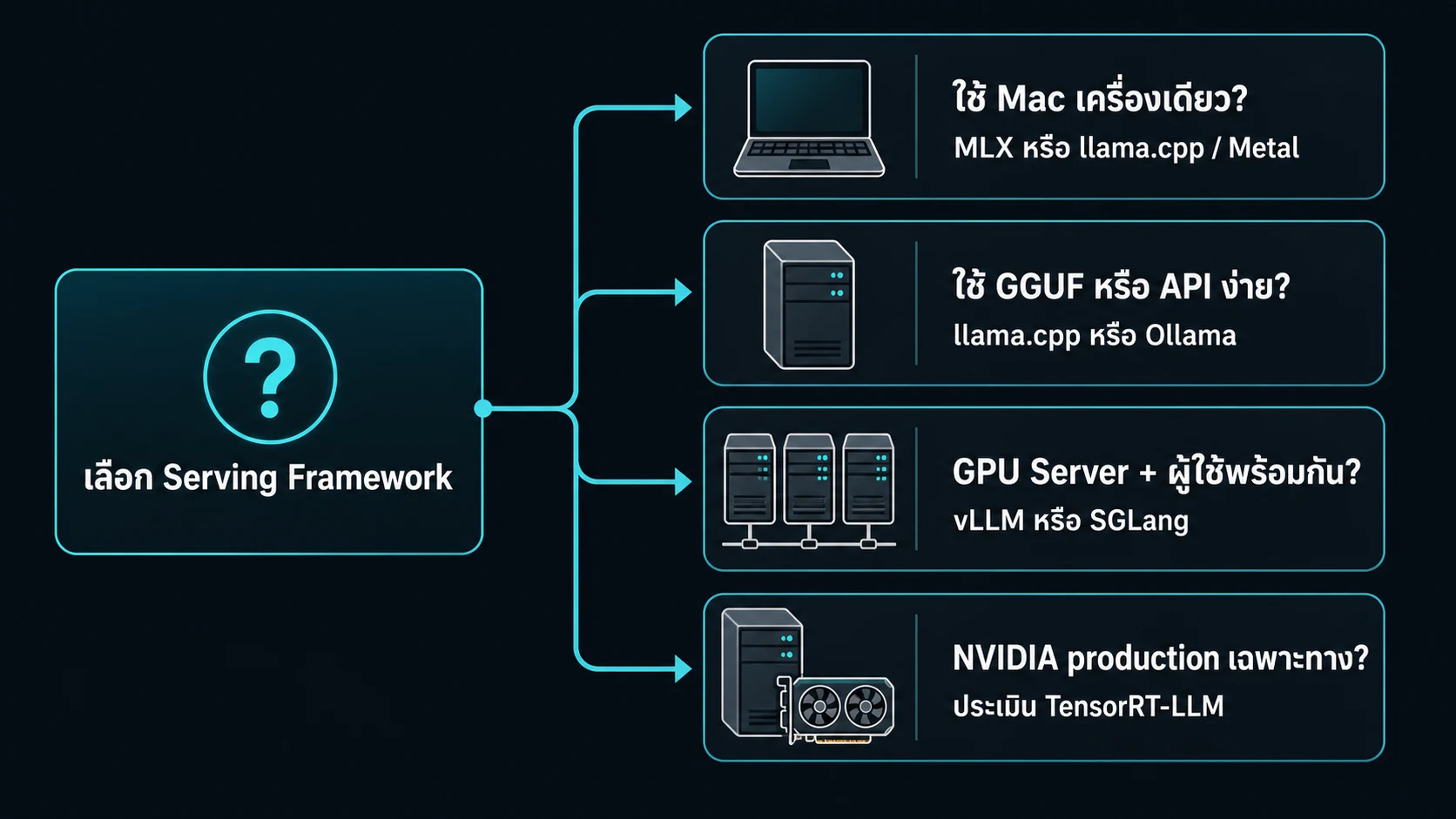
เริ่มจากรูปแบบ request ไม่ใช่ชื่อ framework
- งาน local บน Mac เริ่มจาก MLX หรือ llama.cpp บน Metal
- งาน GGUF หรือ local API เริ่มจาก llama.cpp หรือ Ollama
- GPU server ที่รับหลาย request ใช้ vLLM หรือ SGLang
- เส้นทาง production เฉพาะ NVIDIA ให้ประเมิน TensorRT-LLM

ใช้กับงานจริง
เลือก framework จากรูปแบบ request
Local runner เน้นเปิด model และเรียกใช้ไม่กี่คน Server runtime จัดการ batching, KV cache, concurrency และการสังเกตระบบ
เลือกจาก artifact ที่มี, hardware ที่ใช้ และคนที่จะดูแล service อย่าเริ่มจากชื่อ framework ที่กำลังนิยม
| Framework | เหมาะเริ่มเมื่อ | สิ่งที่ต้องรับผิดชอบ |
|---|---|---|
| llama.cpp | ต้องใช้ GGUF กับ CPU, GPU หรือ Metal | model file, backend flags, benchmark |
| Ollama | ต้องการ local API และ model management ที่ง่าย | model lifecycle, memory limit, feature support |
| MLX | ทำงานบน Apple Silicon | conversion, local API, memory headroom |
| vLLM / SGLang | GPU server ต้องรับหลาย request | batching, KV, backend, rollout |
| TensorRT-LLM | มี NVIDIA production path ที่ทีมดูแลได้ | engine build, version compatibility, operations |
ก่อนเปิด service
- bind service กับ
127.0.0.1จนกว่าจะมีเหตุผลต้อง expose - ตั้ง
max-model-lenและmax-num-seqsตาม capacity ที่วางไว้ - บันทึก checkpoint, runtime release และ flags
- ทำ smoke test, load test และ rollback path
vllm serve <checkpoint> \
  --host 127.0.0.1 \
  --port 8000 \
  --max-model-len <tokens> \
  --max-num-seqs <sequences>
เริ่มด้วย artifact ไม่ใช่ชื่อ framework
ในโลกของ Local LLM ไฟล์โมเดลไม่ได้ถูกสร้างขึ้นมาเหมือนกันทั้งหมด แต่ละเอนจินถูกออกแบบมาให้อ่านไฟล์คนละประเภท (Artifact Types) โดยตรง:
- Safetensors: เป็นฟอร์แมตมาตรฐานของ Hugging Face สำหรับรันบน GPU Server เป็นเส้นทางหลักของ vLLM และ SGLang ให้ความเร็วในการโหลดเข้า VRAM สูงและมีความปลอดภัย
- Pre-quantized Formats (AWQ / GPTQ / FP8 / compressed-tensors / native low-bit): เป็นไฟล์ที่บีบอัดน้ำหนักมาล่วงหน้า จำเป็นต้องรันบน Framework ที่มี Kernel และ Loader ตรงกับสถาปัตยกรรม GPU นั้นๆ
- GGUF: เป็น Binary Container Format ของโปรเจกต์ GGML / llama.cpp ออกแบบมาเพื่อรันบนเครื่องทั่วไป (Mac / PC / Laptop) รวมน้ำหนัก สเปก และ Tokenizer ไว้ในไฟล์เดียว เป็นทางเลือกที่ตรงที่สุดสำหรับ llama.cpp และ Ollama
- MLX Model: เป็นโมเดลที่แปลงโครงสร้างมาสำหรับ Apple Silicon โดยเฉพาะ เพื่อใช้ประโยชน์จาก Unified Memory อย่างเต็มประสิทธิภาพ
- Ollama: เป็นระบบบริหารจัดการโมเดล (Model Management) ที่มี CLI และ API ใช้ง่าย สามารถ import ได้ทั้ง Safetensors model folder, Safetensors adapter, GGUF model และ GGUF adapter ผ่าน Modelfile ในโครงสร้างที่รองรับ
คำแนะนำคือ: อย่าเพิ่งเลือก Framework จากชื่อเสียง แต่ให้ดูไฟล์ในมือก่อน เพราะไฟล์ 4-bit แบรนด์หนึ่งไม่ได้แปลว่าจะสลับไปรันบนอีก Framework หนึ่งได้เสมอไป
vLLM: feature กว้างสำหรับ GPU server
vLLM คือราชาแห่งการทำ Server Inference สำหรับระบบที่มีผู้ใช้งานหลายคนพร้อมกัน (High Concurrency Multi-user Serving)
- จุดเด่นระดับเรือธง: มาพร้อม PagedAttention (การจัดสรรหน่วยความจำ KV Cache เหมือน Virtual Memory ของระบบปฏิบัติการ ทำให้ไม่เสียพื้นที่แรมโดยเปล่าประโยชน์), Continuous Batching, Chunked Prefill, Prefix Caching, OpenAI compatible API, Speculative Decoding, Multi-GPU Parallelism (TP / PP), และ Disaggregated Prefill-Decode (PD)
- Ecosystem และ Quantization กว้างขวาง: รองรับฟอร์แมตบน Hugging Face ครบครัน เช่น FP8, MXFP4, NVFP4, INT8, INT4, GPTQ, AWQ, GGUF, compressed-tensors และ NVIDIA ModelOpt
- จุดที่ต้องระวัง: การติดตั้งบนเซิร์ฟเวอร์ต้องจัด Environment ให้ตรงรุ่น ทั้ง CUDA หรือ ROCm, Driver, GPU Generation และ Kernel ที่รองรับ และที่สำคัญ: GGUF บน vLLM ยัง experimental และ under-optimized จึงไม่ควรใช้เป็น default สำหรับ server performance หรือ feature ครบ ส่วนบนเครื่อง Mac มี vLLM-Metal แยกต่างหากและไม่ได้เทียบเท่า CUDA path
SGLang: ชัดเจนกับ prefix reuse และ serving topology
SGLang เป็น Production Serving Framework ระดับแนวหน้าที่เน้นเรื่อง Ultra-low Latency และ High Throughput โดยเฉพาะงานประเภท AI Agent และ Complex Workflows
- จุดเด่นสำคัญ: มาพร้อม RadixAttention ซึ่งเก่งกาจมากในการทำ Prefix Caching (จดจำ System Prompt หรือประวัติบทสนทนายาวๆ ที่ใช้ซ้ำข้าม Request ได้อย่างชาญฉลาดโดยไม่ต้องคำนวณใหม่), Multi-GPU Parallelism, Structured Outputs (บังคับโมเดลตอบเป็น JSON หรือ Regex ตาม Schema ได้รวดเร็วโดยไม่เพี้ยน), Tool Calling, Speculative Decoding และ Prefill-Decode (PD) Disaggregation
- รูปแบบไฟล์ที่รองรับ: อ่านไฟล์จาก Hugging Face repo หรือ local checkpoint directory โดยตรง เริ่มต้นโหลดจาก Safetensors แล้ว fallback เป็น PyTorch bin รองรับ Pre-quantized AWQ, GPTQ และ FP8 พร้อมทั้งมีระบบ Online Quantization ในบางเส้นทาง
- ข้อควรระวัง: การตั้งค่า Configuration, Kernel Backend และ Serving Topology ต้องตรวจเช็กกับ Release Version และฮาร์ดแวร์อย่างละเอียด อย่าเลือก SGLang เพียงเพราะมีไฟล์ GGUF ในมือ แต่ควรเริ่มจาก Hugging Face Checkpoint ที่รองรับก่อนเสมอ
llama.cpp: ทางตรงของ GGUF และ backend กว้าง
llama.cpp คือสุดยอดเอนจินสายพกพาและเป็นยาสามัญประจำบ้านสำหรับการรันไฟล์ GGUF บนฮาร์ดแวร์แทบทุกประเภทบนโลก
- ความยืดหยุ่นข้ามแพลตฟอร์ม: สามารถรันได้ตั้งแต่ CPU ทั่วไป, Mac Apple Silicon (Metal), NVIDIA GPU (CUDA), AMD GPU (ROCm/HIP), Intel (SYCL), ไปจนถึง Vulkan
- ไม่ใช่แค่ Command Line: โปรแกรมมาพร้อม llama-server ซึ่งเปิดให้บริการ OpenAI compatible API, Continuous Batching, Multi-user Parallel Decoding, Monitoring Metrics, Schema constrained JSON, Tool Calling และ Speculative Decoding ในตัว
- จุดเด่น: ตัวโปรแกรมเป็น C/C++ Binary ขนาดกะทัดรัด กิน Resource น้อย พกพาง่าย และมีตัวเลือก Backend กว้างที่สุด
- ข้อจำกัด: ไฟล์โมเดลหลักต้องผ่านการแปลงเป็น GGUF ให้ตรงตาม Architecture และ Chat Template เสียก่อน Safetensors ไม่ใช่ artifact ที่เปิดตรงแบบ default เหมือน vLLM or SGLang และหากต้องการทำ Multi-node Cluster ขนาดใหญ่ จะต้องออกแบบระบบ Scale-out และ Monitoring ด้วยตัวเองมากกว่า
MLX-LM: native Apple Silicon แต่ไม่ใช่ production server
MLX-LM เป็นเฟรมเวิร์กของทีม Apple Research ที่พัฒนาขึ้นสำหรับชิป Mac Apple Silicon (M-Series) โดยเฉพาะ
- จุดแข็งระดับ Native: โหลดโมเดลในรูปแบบ MLX-compatible จาก Hugging Face หรือแปลงจาก Local Path มารันบน Unified Memory ได้อย่างลื่นไหล รองรับการทำ 4-bit Quantization, LoRA Fine-tuning และมี MLX-LM server ที่เปิด HTTP API คล้าย OpenAI รวมถึงรองรับ Draft Model สำหรับ Speculative Decoding
- เหมาะสำหรับ: การทำงานพัฒนาส่วนบุคคล (Local Mac Development) และการทดลองวิจัยบนแล็ปท็อปเครื่องเดียวได้อย่างเงียบสงบและประหยัดพลังงาน
- ข้อจำกัดระดับวิศวกรรม: เอกสารทางการของ MLX-LM ระบุชัดเจนว่าตัว server มีเพียง basic security checks และไม่แนะนำสำหรับ production ภายนอก และโปรดจำไว้ว่าโมเดล MLX กับ GGUF เป็นคนละชนิดกัน หากมีไฟล์ GGUF ในมือ ควรเลือก llama.cpp บน Metal แทน
Ollama: model management และ local API ที่เริ่มเร็ว
Ollama คือสะพานเชื่อมที่ทำให้คนทั่วไปและนักพัฒนาสามารถเริ่มใช้งาน Local LLM ได้ง่ายที่สุดภายในไม่กี่นาที
- ความสะดวกสบาย: ติดตั้งง่าย ดาวน์โหลดโมเดลผ่านคำสั่ง
ollama runและเปิด Local REST API ให้แอปพลิเคชันเรียกใช้ได้ทันทีโดยไม่ต้องมีความรู้ด้านการตั้งค่าคอมไพเลอร์ - ความยืดหยุ่นในการนำเข้า: รองรับ Modelfile สำหรับสร้างและปรับแต่งโมเดล สามารถ Import ได้ทั้ง Safetensors model folder, Safetensors adapter, GGUF model และ GGUF adapter ในโครงสร้างสถาปัตยกรรมที่รองรับ รวมถึงสั่ง Quantize จากไฟล์ต้นฉบับ FP16/FP32 ได้ในตัว
- ข้อควรระวัง: ความง่ายของ Ollama ไม่ได้มาแทนที่การคำนวณ Capacity Plan, การเลือก Kernel Backend เฉพาะทาง หรือระบบ Observability และ Scale-out ละเอียดแบบ vLLM และ SGLang หากต้องการรัน Context ยาวมากๆ หรือรับผู้ใช้หลายสิบคนพร้อมกัน ควรวัดผล Memory Peak และ Latency ด้วยชุด Benchmark จริงเสมอ
เลือกให้เร็วจากไฟล์และ workload
- vLLMHugging Face checkpoint on CUDA or ROCm server ที่ต้อง throughput, batching, prefix cache, distributed serving และ quant server path กว้าง
- SGLangHugging Face checkpoint ที่ request reuse prefix มาก, ต้อง PD disaggregation, structured output หรือ tune serving topology
- llama.cppGGUF, CPU or Metal local inference, portable backend หรือ lightweight OpenAI compatible server
- MLX-LMMLX compatible model บน Apple Silicon สำหรับ local development, conversion, fine tuning และ personal API
- Ollamaต้องการ pull and manage model หรือ import GGUF and Safetensors เพื่อ local API ที่ตั้งง่าย
คำเตือนเรื่องไฟล์: อย่า re-quantize หรือแปลงข้าม format โดยไม่รู้ต้นทาง เก็บ base model, tokenizer, chat template, quant recipe และ runtime release ไว้ด้วยกันเพื่อย้อนตรวจคุณภาพและ compatibility ได้
ก่อนเปิด production
การเตรียมตัวก่อนนำเซิร์ฟเวอร์ขึ้น Production จริง:
- กำหนดขนาดทรัพยากร: ตั้งค่า
max-model-lenและ Concurrency (max-num-seqs) ให้พอดีกับงบประมาณ VRAM ที่คำนวณไว้ ไม่ตั้งเพดานเผื่อจนล้นแรม - ความปลอดภัยเครือข่าย: Bind Service เข้ากับ
127.0.0.1(Localhost) ก่อนเสมอ แล้วค่อยเชื่อมต่อผ่าน Reverse Proxy / API Gateway ที่มีการยืนยันตัวตน (Authentication) - บันทึกพิมพ์เขียวระบบ: จดบันทึก Artifact Hash, เวอร์ชันของ Framework, ไดรเวอร์ GPU และ Flags คำสั่งเริ่มระบบไว้อย่างเคร่งครัด
- วัดผลก่อนปล่อยจริง: ทำการวัดผล TTFT, Inter-Token Latency (ITL), Output Throughput (tok/s), p95 Tail Latency, Peak VRAM และคุณภาพคำตอบบนชุดคำถามจริง จำไว้ว่า Framework ที่ได้คะแนนเร็วที่สุดใน Benchmark สั้นๆ อาจไม่ใช่ตัวที่เสถียรที่สุดเมื่อเจอกับ Real-world Traffic
แหล่งอ้างอิง
ลองกับ configuration ของคุณ
นำ model, quantization, context, framework และ hardware ที่คิดไว้ไปลองใน calculator จากนั้นยืนยันด้วย benchmark ที่ใกล้ production
เปิดเครื่องคำนวณ