LOCAL LLM FIELD GUIDE
Serving frameworks: choose from workload, hardware, and model files
To choose a Serving Framework (the server software that runs your LLM), start from the model file artifact you have. Like matching audio formats to the right player: Hugging Face Safetensors checkpoints for GPU servers typically point to vLLM or SGLang, GGUF files for local PCs and Macs point to llama.cpp or Ollama, and MLX models on Apple Silicon point to MLX-LM. Then decide based on concurrency, latency requirements, and operational complexity.

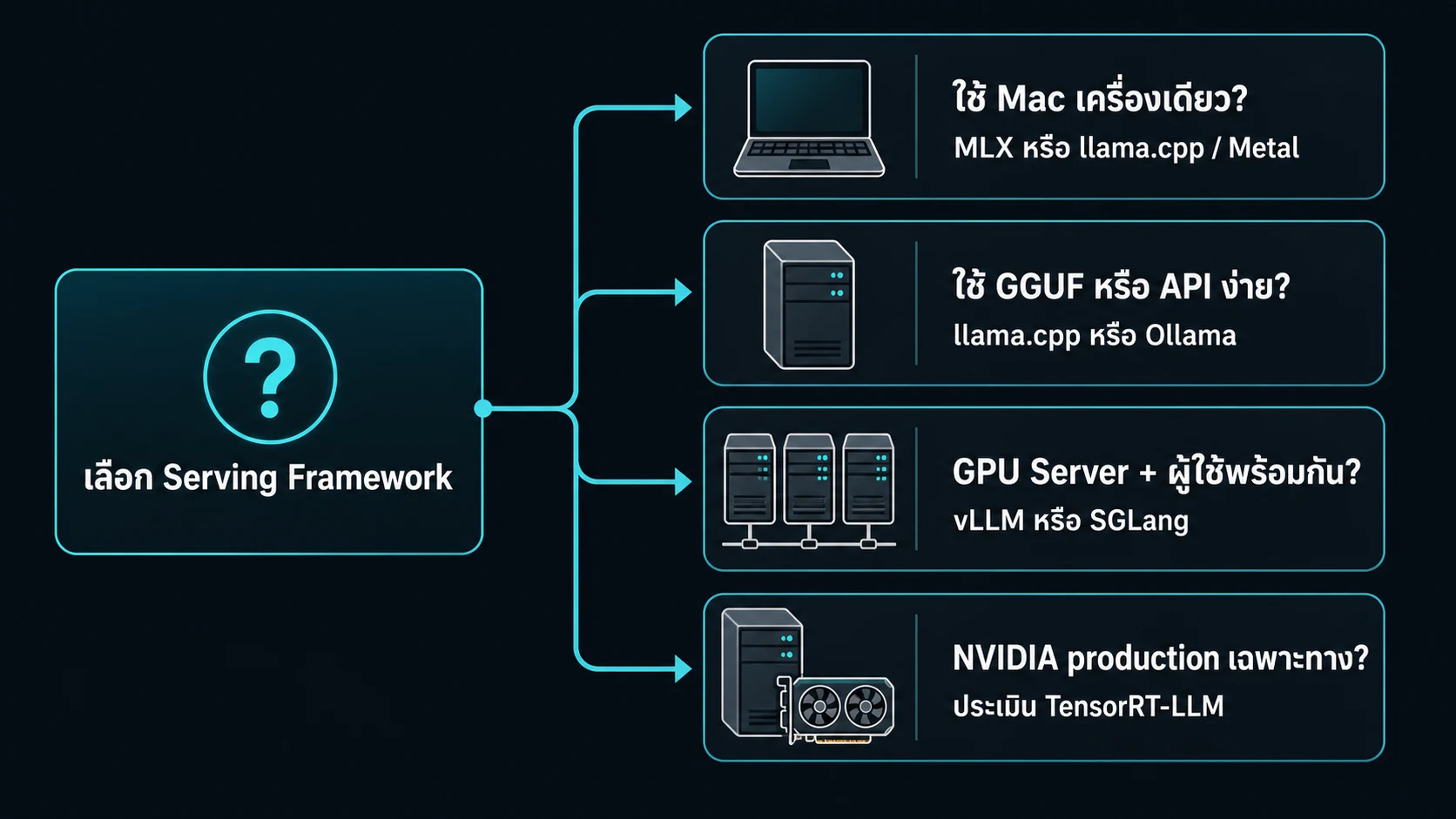
DECISION TREE
Start with the request shape, not a framework name
- For Mac local work, start with MLX or llama.cpp on Metal
- For GGUF or a simple local API, start with llama.cpp or Ollama
- For a GPU server that handles concurrent requests, consider vLLM or SGLang
- For an NVIDIA-specific production path, evaluate TensorRT-LLM

USE IT ON REAL WORK
Choose a framework from request shape
A local runner focuses on loading a model for a few people. A server runtime manages batching, KV cache, concurrency, and observability.
Choose from the artifact you have, the hardware you run, and the people who operate the service. Do not start from the most popular framework name.
| Framework | Start here when | You own |
|---|---|---|
| llama.cpp | You need GGUF on CPU, GPU, or Metal | Model file, backend flags, benchmark |
| Ollama | You want a simple local API and model management | Model lifecycle, memory limit, feature support |
| MLX | You work on Apple Silicon | Conversion, local API, memory headroom |
| vLLM / SGLang | A GPU server handles concurrent requests | Batching, KV, backend, rollout |
| TensorRT-LLM | The team supports an NVIDIA production path | Engine build, version compatibility, operations |
Before opening a service
- Bind to
127.0.0.1until there is a reason to expose it - Set
max-model-lenandmax-num-seqsfrom the capacity plan - Record the checkpoint, runtime release, and flags
- Have a smoke test, load test, and rollback path
vllm serve <checkpoint> \
  --host 127.0.0.1 \
  --port 8000 \
  --max-model-len <tokens> \
  --max-num-seqs <sequences>
Start with the artifact, not the framework name
In local LLM engineering, model files are not interchangeable. Each server runtime is tailored to execute specific artifact types:
- Safetensors: The standard Hugging Face format for GPU servers and the direct path for vLLM and SGLang, providing fast memory-mapped loading into VRAM and high security.
- Pre-quantized Formats (AWQ / GPTQ / FP8 / compressed-tensors / native low-bit): Pre-compressed weights requiring dedicated loaders and accelerated compute kernels matching the GPU architecture.
- GGUF: A binary container format from GGML / llama.cpp designed for local PCs and Macs, bundling weights, specs, and tokenizer metadata into a single file. The primary native path for llama.cpp and Ollama.
- MLX Model: Formatted specifically for Apple Silicon to maximize Unified Memory throughput.
- Ollama: A model-management layer with intuitive CLI and APIs capable of importing Safetensors model folders, Safetensors adapters, GGUF models, and GGUF adapters through Modelfiles for supported architectures.
Key Rule: Choose the framework that natively supports your artifact. Identical four-bit labels do not mean artifacts are interchangeable across engines.
vLLM: broad features for GPU servers
vLLM is the industry heavyweight for high-concurrency multi-user GPU server inference:
- Flagship Features: Includes PagedAttention (managing KV Cache memory like OS virtual memory pages to eliminate memory waste), Continuous Batching, Chunked Prefill, Prefix Caching, OpenAI-compatible API, Speculative Decoding, Multi-GPU Parallelism (TP / PP), and Disaggregated Prefill-Decode (PD).
- Broad Quantization Ecosystem: Natively supports Hugging Face formats including FP8, MXFP4, NVFP4, INT8, INT4, GPTQ, AWQ, GGUF, compressed-tensors, and NVIDIA ModelOpt.
- Important Caveats: Server deployment requires matching CUDA/ROCm versions, drivers, kernels, and GPU generations. GGUF in vLLM remains experimental and under-optimized, so it is not the default for a performance-sensitive or feature-complete server. vLLM-Metal is separate and is not CUDA parity.
SGLang: explicit prefix reuse and serving topology
SGLang is a premier production serving framework engineered for ultra-low latency, high throughput, and complex agentic workflows.
- Core Advantages: Features RadixAttention (intelligently caching and reusing shared system prompts and multi-turn conversation history across requests without redundant computation), Multi-GPU Parallelism, Structured Outputs (guaranteeing strict JSON and regex schema conformance with minimal latency), Tool Calling, Speculative Decoding, and Prefill-Decode (PD) Disaggregation.
- Supported File Paths: Directly loads from Hugging Face repos or local checkpoint directories (starting with Safetensors and falling back to PyTorch bin), reading pre-quantized AWQ, GPTQ, and FP8 configurations with online quantization options.
- Important Caveats: Configuration, kernel backend, and topology must be validated against the exact release and hardware. Do not choose SGLang merely because a GGUF file exists start with a supported Hugging Face checkpoint.
llama.cpp: the direct GGUF path with broad backends
llama.cpp is the ultimate portable engine and the universal foundation for executing GGUF files across virtually any hardware:
- Cross-Platform Flexibility: Runs seamlessly on standard CPUs, Apple Silicon (Metal), NVIDIA GPUs (CUDA), AMD GPUs (ROCm/HIP), Intel GPUs (SYCL), and Vulkan.
- Fully Featured Server: The included
llama-serverprovides an OpenAI-compatible API, Continuous Batching, Multi-user Parallel Decoding, Prometheus metrics monitoring, Schema-constrained JSON, Tool Calling, and Speculative Decoding out of the box. - Strengths: Compact C/C++ binary, lightweight memory footprint, and broadest hardware backend compatibility.
- Limitations: Requires models converted into GGUF format with valid architectures and chat templates. Safetensors is not the default direct-load artifact. Large multi-node cluster fleets require manual scaling and lifecycle orchestration compared to cluster-native engines.
MLX-LM: native Apple Silicon, not a production server
MLX-LM is developed by Apple's machine learning research team specifically for Mac Apple Silicon (M-Series) chips.
- Native Mac Power: Loads MLX-compatible repositories or converted local paths directly into Mac Unified Memory, supporting fast inference, 4-bit quantization, LoRA fine-tuning, and speculative decoding. Includes an HTTP server with OpenAI-compatible chat endpoints.
- Ideal Use Case: Frictionless personal local development and AI research on an everyday Mac workstation.
- Engineering Limitation: MLX-LM documentation clearly states that the MLX-LM server provides only basic security checks and is not recommended for production serving. MLX models and GGUF are different artifacts for GGUF files on Mac, choose llama.cpp on Metal instead.
Ollama: fast local API and model management
Ollama is the easiest bridge for developers and beginners to deploy local LLMs within minutes:
- Simplicity and Speed: One-click installation, single-command model downloads (
ollama run ...), and an immediate local REST API for applications without manual compiler configuration. - Flexible Model Ingestion: Supports Modelfiles to create, customize, and manage models. Imports Safetensors model folders, Safetensors adapters, GGUF models, and GGUF adapters for supported architectures, with built-in quantization from FP16/FP32 sources.
- Important Caveats: Ollama's simplicity does not replace the capacity planning, kernel selection, detailed telemetry, or distributed cluster orchestration provided by vLLM and SGLang. Always validate peak VRAM and latency under production traffic before deployment.
Choose quickly from the artifact and workload
- vLLMA Hugging Face checkpoint on a CUDA or ROCm server needing throughput, batching, prefix cache, distributed serving, and broad server-quant paths
- SGLangA Hugging Face checkpoint with high prefix reuse, PD disaggregation, structured outputs, or a tunable serving topology
- llama.cppGGUF, CPU or Metal local inference, a portable backend, or a lightweight OpenAI-compatible server
- MLX-LMAn MLX-compatible model on Apple Silicon for local development, conversion, fine tuning, and a personal API
- OllamaSimple pull and model management, or import of GGUF and Safetensors for a local API
File warning: Do not requantize or convert across formats without knowing the source. Keep the base model, tokenizer, chat template, quant recipe, and runtime release together so quality and compatibility can be traced.
Before production
Essential checklist before deploying to production:
- Sizing and Limits: Set
max-model-lenand concurrency (max-num-seqs) strictly within your calculated VRAM budget. - Network Security: Always bind the service to
127.0.0.1(localhost) first, routing external traffic through a reverse proxy or API gateway with authentication. - Record Blueprint: Log the exact artifact hash, framework release, GPU driver version, and runtime flags.
- Empirical Testing: Measure TTFT, Inter-Token Latency (ITL), Output Throughput (tok/s), p95 tail latencies, peak memory, and answer quality on real workload prompts. The fastest framework on a short benchmark may not be the most stable under real-world traffic.
Sources
Try your configuration
Put the intended model, quantization, context, framework, and hardware into the calculator, then validate with a production-like benchmark.
Open calculator