LOCAL LLM FIELD GUIDE
Choose Local LLM Hardware by Workload, Not GPU Names
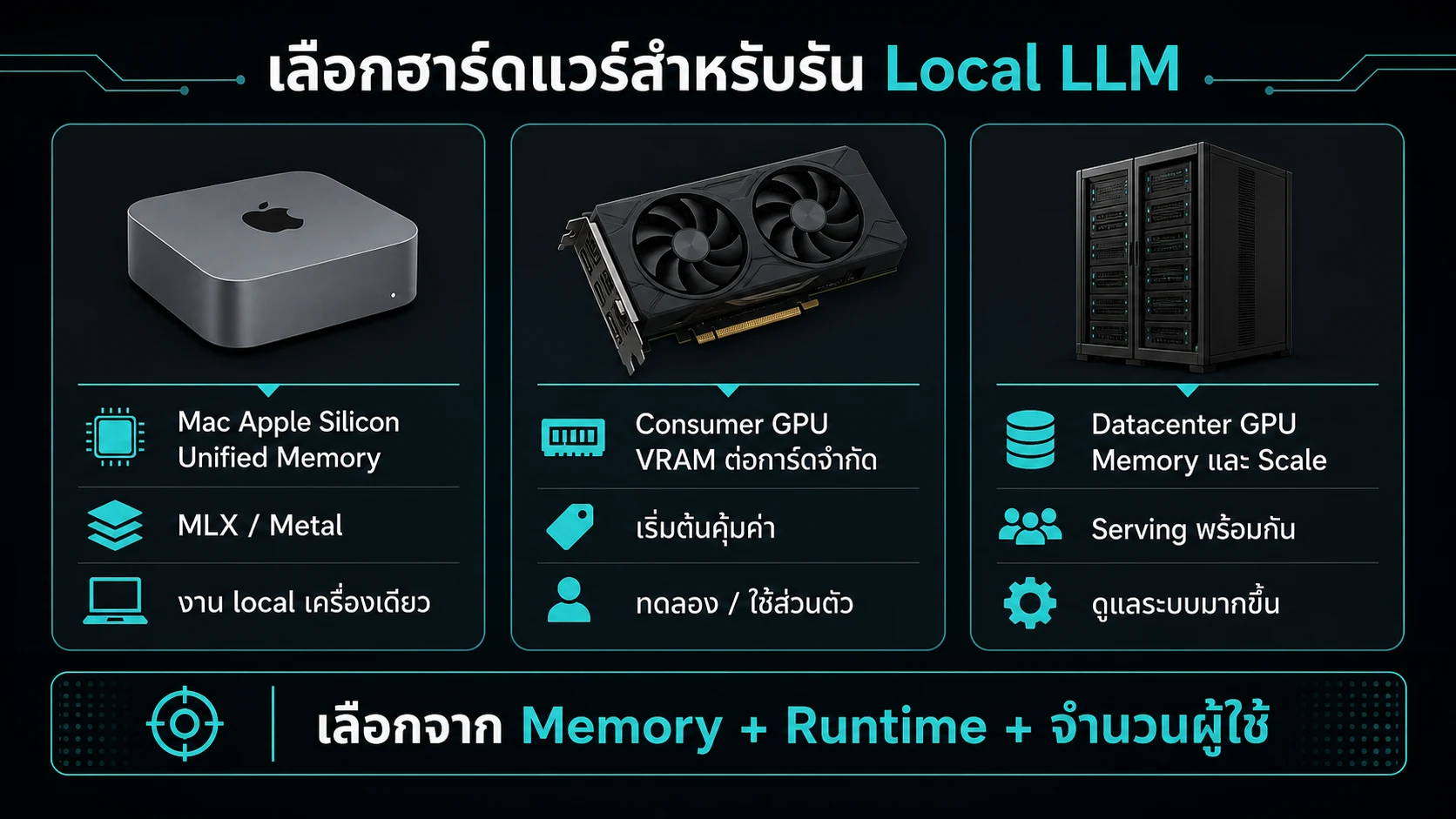
The popular question 'Which GPU should I buy for LLMs?' cannot be answered by GPU model names alone. Selecting the right hardware requires defining your target model size, serving framework, required concurrency, and budget. Mac Apple Silicon excels as a personal single-machine workstation for large models, NVIDIA is the gold standard for high-throughput production servers, and AMD offers attractive VRAM-per-dollar value while requiring careful ROCm support matrix validation.
CHOOSE BY CONSTRAINT
A tier is an operating model, not a ranking
 AppleMLX, Metal, and unified memory in an everyday computer
 NVIDIACUDA, TensorRT-LLM, and a broad server ecosystem
 AMDROCm, HIP, and Instinct or RDNA paths needing matrix checks
USE IT ON REAL WORK
Choose hardware from the deployment path
Start with the runtime and artifact you must use. They determine the accelerator path before price. Then compare reserved memory, bandwidth, and operating effort.
More VRAM does not automatically make a workflow easier. Compare the model, context, and concurrent requests with a real path to run them.
| Option | Start with | Verify |
|---|---|---|
| Mac Apple Silicon | MLX or GGUF on Metal | Unified memory, conversion path, local workflow |
| NVIDIA | A supported CUDA runtime and kernel | VRAM, bandwidth, driver, serving topology |
| AMD | ROCm and HIP support in the runtime | GPU model, kernel path, artifact support |
Questions before buying or renting
- Which model and quantization must run
- How many working-context tokens and concurrent sequences
- Whether TTFT, per-user tok/s, or aggregate throughput matters
- How much Linux, CUDA, or ROCm operation the team can support
- Whether the plan is one device, replicas, or tensor parallel
hardware = <device>
framework = <runtime>
model = <checkpoint>
working_context = <tokens>
batch = <concurrent sequences>
Mac Apple Silicon: everyday work and local LLMs
The Unified Memory Architecture (UMA) of Mac Apple Silicon (M2/M3/M4 Series) is a game-changer for local LLM workflows by sharing a single RAM pool across CPU, GPU, and Neural Engine!
- Strengths: Configurable with 64 GB, 96 GB, 128 GB, or 192 GB RAM to run 70B or 120B models (via GGUF Q4 or MLX) smoothly on a single desktop without complex multi-GPU setups, while doubling as a general workstation for coding, media, and daily tasks.
- Limitations: UMA RAM is shared with macOS and other apps, non-upgradeable post-purchase, and memory bandwidth (e.g. M4 Max at 410-546 GB/s, M3 Ultra at 819 GB/s) remains below high-end HBM3 GPU server clusters (2,000 - 3,000+ GB/s). Thus, Macs are ideal personal workstations or dev machines, but not primary high-concurrency production serving nodes.
Mac and vLLM: available, but not CUDA parity
The developer community created vLLM-Metal, a hardware plugin leveraging MLX backend to expose OpenAI-compatible HTTP serving on Mac hardware.
It is inaccurate to say Macs cannot run vLLM. However, feature support depends on model architecture, and server-grade features (cross-card Tensor Parallelism, certain speculative decoding methods, LoRA serving, VLMs, complex MoEs) remain unsupported or unvalidated.
For production fleet scaling, do not design architecture around CUDA vLLM features expecting identical performance or feature parity on Mac Metal!
NVIDIA: the broadest server-inference ecosystem
NVIDIA CUDA remains the undisputed gold standard for server inference, featuring the industry's most mature software ecosystem.
- Software Stack Maturity: Frameworks like vLLM, SGLang, TensorRT-LLM, FlashAttention-3, ModelOpt, and profiling tools are developed and optimized for CUDA first.
- Hardware Generations & Precision Paths:
- Blackwell (RTX 5090, B200, DGX GB300): Features FP4 Tensor Cores supporting NVFP4 / modelopt_fp4 and native FP4 execution for breakthrough decode speeds.
- Ada Lovelace & Hopper (RTX 4090, L40S, H100): Supports FP8 (E4M3 / E5M2) for weights and KV Cache, halving memory footprint with zero speed penalty.
- Interconnect: High-end datacenter GPUs feature NVLink / NVSwitch providing 900 - 1,800 GB/s inter-card bandwidth, making multi-GPU Tensor Parallelism (TP=2, TP=4, TP=8) seamless without PCIe bottlenecks.
AMD: strong memory value, but validate the support matrix
AMD ROCm / HIP hardware offers attractive VRAM-per-dollar ratios, such as Instinct MI300X (192 GB HBM3) or consumer Radeon RDNA GPUs.
Key considerations for AMD deployment:
- Software & Kernel Support Matrix: While vLLM-ROCm, SGLang, and llama.cpp support on AMD has improved dramatically, kernel availability (FlashAttention, AWQ loaders, FP8 KV, Speculative Decoding) depends heavily on GPU generation, ROCm drivers, and runtime releases.
- Instinct vs Radeon: Enterprise Instinct MI300X/MI350 GPUs feature tight enterprise tuning for FP8, FP8 KV, AWQ, and AMD Quark (including MXFP4). Consumer Radeon RDNA GPUs may lack certain CUDA-equivalent kernel optimizations.
Recommendation: Do not assume AMD cannot run, nor that identical quantization names achieve equal speed across all AMD generations. Always inspect calculator-supported options for your target GPU.
Consumer, workstation, datacenter
Hardware is categorized into 3 main tiers based on budget and workload:
- Consumer GPUs (RTX 5090 / 4090 / 3090): Ideal for local development, personal workstations, and budget single-GPU inference. Offers high memory bandwidth (1,000+ GB/s) at accessible pricing, but limited by VRAM caps (24-32 GB) and lack of NVLink in newer models.
- Workstation GPUs (RTX 6000 Ada, Radeon PRO): Expands VRAM to 48 GB+, includes ECC memory for error protection, and features server-friendly power/form-factor designs.
- Datacenter GPUs (H100, H200, B200, DGX Station GB300, MI300X): Designed for 24/7 enterprise fleets requiring HBM3/HBM3e memory bandwidth (3,000+ GB/s), liquid cooling, and NVSwitch fabric for seamless multi-card Tensor Parallelism.
(The table below lists hardware and prices from the calculator, representing Thailand planning estimates rather than commercial quotes).
Questions before buying
Five essential questions before buying or renting hardware:
- What model size (B) and quantization format will you run?
- What working context length is required (e.g. 4K, 32K, 128K)?
- How many concurrent users must be served (Batch Size)?
- Is the primary goal low personal latency (TTFT) or high aggregate throughput?
- What operating environment expertise does your team have (macOS, Linux CUDA, ROCm)?
Plug these parameters into the LLM VRAM Calculator to verify Peak VRAM and speed before purchase!
CATALOG PRICE LIST
Hardware and prices from the calculator
This list reads the same catalog as the dropdown and result card. Discrete GPU prices are planning card prices, while Apple, DGX, and Strix Halo are whole-machine prices for the evidenced configuration. Verify stock, warranty, and an actual quote before purchase.
Consumer and general-purpose machines
| Family | Hardware | Memory and price |
|---|---|---|
| NVIDIA RTX 30 Desktop | RTX 3060 | 12 GB: ฿12,900 |
| NVIDIA RTX 30 Desktop | RTX 3060 Ti | 8 GB: ฿13,900 |
| NVIDIA RTX 30 Desktop | RTX 3070 | 8 GB: ฿16,900 |
| NVIDIA RTX 30 Desktop | RTX 3070 Ti | 8 GB: ฿18,900 |
| NVIDIA RTX 30 Desktop | RTX 3080 | 10 GB: ฿24,900 |
| NVIDIA RTX 30 Desktop | RTX 3080 | 12 GB: ฿26,900 |
| NVIDIA RTX 30 Desktop | RTX 3080 Ti | 12 GB: ฿29,900 |
| NVIDIA RTX 30 Desktop | RTX 3090 | 24 GB: ฿46,900 |
| NVIDIA RTX 30 Desktop | RTX 3090 Ti | 24 GB: ฿52,900 |
| NVIDIA RTX 40 Desktop | RTX 4060 | 8 GB: ฿11,900 |
| NVIDIA RTX 40 Desktop | RTX 4060 Ti | 8 GB: No exact price 16 GB: No exact price |
| NVIDIA RTX 40 Desktop | RTX 4070 | 12 GB: ฿22,900 |
| NVIDIA RTX 40 Desktop | RTX 4070 Super | 12 GB: ฿24,900 |
| NVIDIA RTX 40 Desktop | RTX 4070 Ti | 12 GB: ฿29,900 |
| NVIDIA RTX 40 Desktop | RTX 4070 Ti Super | 16 GB: ฿34,900 |
| NVIDIA RTX 40 Desktop | RTX 4080 | 16 GB: ฿49,900 |
| NVIDIA RTX 40 Desktop | RTX 4080 Super | 16 GB: ฿44,900 |
| NVIDIA RTX 40 Desktop | RTX 4090 | 24 GB: ฿79,900 |
| NVIDIA RTX 50 Desktop | RTX 5060 | 8 GB: ฿14,900 |
| NVIDIA RTX 50 Desktop | RTX 5060 Ti | 8 GB: No exact price 16 GB: ฿25,500 |
| NVIDIA RTX 50 Desktop | RTX 5070 | 12 GB: ฿27,900 |
| NVIDIA RTX 50 Desktop | RTX 5070 Ti | 16 GB: ฿42,400 |
| NVIDIA RTX 50 Desktop | RTX 5080 | 16 GB: ฿47,900 |
| NVIDIA RTX 50 Desktop | RTX 5090 | 32 GB: ฿179,900 |
| NVIDIA RTX 40 Laptop | RTX 4060 Laptop | 8 GB: ฿39,900 |
| NVIDIA RTX 40 Laptop | RTX 4070 Laptop | 8 GB: ฿49,900 |
| NVIDIA RTX 40 Laptop | RTX 4080 Laptop | 12 GB: ฿69,900 |
| NVIDIA RTX 40 Laptop | RTX 4090 Laptop | 16 GB: ฿99,900 |
| Apple Silicon | M1 | 8 GB: No exact price 16 GB: No exact price |
| Apple Silicon | M1 Pro | 16 GB: No exact price 32 GB: No exact price |
| Apple Silicon | M1 Max | 32 GB: No exact price 64 GB: No exact price |
| Apple Silicon | M1 Ultra | 64 GB: No exact price 128 GB: No exact price |
| Apple Silicon | M2 | 8 GB: No exact price 16 GB: No exact price 24 GB: No exact price |
| Apple Silicon | M2 Pro | 16 GB: No exact price 32 GB: No exact price |
| Apple Silicon | M2 Max | 32 GB: No exact price 64 GB: No exact price 96 GB: No exact price |
| Apple Silicon | M2 Ultra | 64 GB: No exact price 128 GB: No exact price 192 GB: No exact price |
| Apple Silicon | M3 | 8 GB: No exact price 16 GB: No exact price 24 GB: No exact price |
| Apple Silicon | M3 Pro | 18 GB: No exact price 36 GB: No exact price |
| Apple Silicon | M3 Max (30-core GPU) | 36 GB: No exact price 96 GB: No exact price |
| Apple Silicon | M3 Max (40-core GPU) | 48 GB: No exact price 64 GB: No exact price 128 GB: No exact price |
| Apple Silicon | M3 Ultra | 96 GB: ฿242,400 256 GB: No exact price 512 GB: No exact price |
| Apple Silicon | M4 | 16 GB: ฿59,900 24 GB: ฿66,900 32 GB: No exact price |
| Apple Silicon | M4 Pro | 24 GB: ฿64,900 48 GB: ฿85,900 |
| Apple Silicon | M4 Max (32-core GPU) | 36 GB: ฿89,900 |
| Apple Silicon | M4 Max (40-core GPU) | 48 GB: No exact price 64 GB: ฿124,900 128 GB: No exact price |
| Apple Silicon | M5 | 16 GB: ฿48,400 24 GB: ฿51,900 32 GB: ฿58,900 |
| Apple Silicon | M5 Pro (15-core CPU / 16-core GPU) | 24 GB: ฿61,900 48 GB: ฿82,900 64 GB: ฿96,900 |
| Apple Silicon | M5 Pro (18-core CPU / 20-core GPU) | 24 GB: ฿68,900 48 GB: ฿89,900 64 GB: ฿103,900 |
| Apple Silicon | M5 Max (18-core CPU / 32-core GPU) | 36 GB: ฿89,900 |
| Apple Silicon | M5 Max (18-core CPU / 40-core GPU) | 48 GB: ฿110,900 64 GB: ฿124,900 128 GB: ฿180,900 |
| Apple Silicon | M5 Ultra (30-core CPU / 64-core GPU) | 96 GB: ฿199,900 256 GB: ฿339,900 |
| Apple Silicon | M5 Ultra (36-core CPU / 80-core GPU) | 96 GB: ฿245,400 256 GB: ฿385,400 |
| Apple Silicon | M6 | 16 GB: ฿32,900 24 GB: ฿39,900 32 GB: ฿46,900 |
| AMD Radeon RDNA3 Desktop | RX 7900 XTX | 24 GB: ฿39,900 |
| AMD Radeon RDNA3 Desktop | RX 7900 XT | 20 GB: ฿36,900 |
| AMD Radeon RDNA3 Desktop | RX 7900 GRE | 16 GB: ฿21,900 |
| AMD Radeon RDNA3 Desktop | RX 7800 XT | 16 GB: ฿17,900 |
| AMD Radeon RDNA3 Desktop | RX 7700 XT | 12 GB: ฿15,900 |
| AMD Radeon RDNA3 Desktop | RX 7600 XT | 16 GB: ฿12,900 |
| AMD Radeon RDNA4 Desktop | RX 9060 XT | 16 GB: ฿15,900 |
| AMD Radeon RDNA4 Desktop | RX 9070 XT | 16 GB: ฿25,900 |
| AMD Radeon RDNA4 Desktop | RX 9070 | 16 GB: No exact price |
| AMD Strix Halo | Strix Halo | 128 GB: ฿99,990 |
| Intel Arc Desktop | Arc A770 | 16 GB: ฿12,900 |
| Intel Arc Desktop | Arc B570 | 10 GB: ฿7,990 |
| Intel Arc Desktop | Arc B580 | 12 GB: ฿9,900 |
Workstation
| Family | Hardware | Memory and price |
|---|---|---|
| NVIDIA RTX A Workstation | RTX A2000 | 12 GB: ฿11,500 |
| NVIDIA RTX A Workstation | RTX A4000 | 16 GB: ฿37,900 |
| NVIDIA RTX A Workstation | RTX A4500 | 20 GB: ฿37,400 |
| NVIDIA RTX A Workstation | RTX A5000 | 24 GB: ฿50,000 |
| NVIDIA RTX A Workstation | RTX A6000 | 48 GB: ฿119,000 |
| NVIDIA RTX Ada Workstation | RTX 2000 Ada | 16 GB: ฿29,900 |
| NVIDIA RTX Ada Workstation | RTX 4000 SFF Ada | 20 GB: ฿53,500 |
| NVIDIA RTX Ada Workstation | RTX 4000 Ada | 20 GB: ฿55,900 |
| NVIDIA RTX Ada Workstation | RTX 4500 Ada | 24 GB: ฿115,500 |
| NVIDIA RTX Ada Workstation | RTX 5000 Ada | 32 GB: ฿195,000 |
| NVIDIA RTX Ada Workstation | RTX 6000 Ada | 48 GB: ฿339,000 |
| NVIDIA RTX PRO Workstation | RTX PRO 2000 Blackwell | 16 GB: ฿62,900 |
| NVIDIA RTX PRO Workstation | RTX PRO 4000 Blackwell SFF | 24 GB: ฿72,900 |
| NVIDIA RTX PRO Workstation | RTX PRO 4000 Blackwell | 24 GB: ฿108,000 |
| NVIDIA RTX PRO Workstation | RTX PRO 4500 Blackwell | 32 GB: ฿149,000 |
| NVIDIA RTX PRO Workstation | RTX PRO 5000 Blackwell | 48 GB: ฿299,000 72 GB: ฿315,900 |
| NVIDIA RTX PRO Workstation | RTX PRO 6000 Blackwell | 96 GB: ฿599,000 |
| NVIDIA RTX PRO Workstation | RTX PRO 6000 Blackwell Max-Q | 96 GB: ฿589,000 |
| AMD Radeon PRO Workstation | Radeon PRO W6800 | 32 GB: ฿32,900 |
| AMD Radeon PRO Workstation | Radeon PRO W7800 | 32 GB: ฿95,000 |
| AMD Radeon PRO Workstation | Radeon PRO W7900 | 48 GB: ฿119,000 |
| AMD Radeon PRO Workstation | Radeon AI PRO R9700 | 32 GB: ฿60,900 |
| Intel Arc Pro Workstation | Arc Pro B50 | 16 GB: ฿14,900 |
| Intel Arc Pro Workstation | Arc Pro B60 | 24 GB: ฿27,900 |
| Intel Arc Pro Workstation | Arc Pro B70 | 32 GB: ฿63,900 |
Datacenter and AI appliances
| Family | Hardware | Memory and price |
|---|---|---|
| NVIDIA GB10 Blackwell | DGX Spark | 128 GB: ฿182,900 |
| NVIDIA GB300 Grace Blackwell Ultra | DGX Station GB300 | 748 GB: ฿4,166,580 |
| Huawei Ascend 310P | Atlas 300I Duo 48GB | 48 GB: ฿42,000 |
| Huawei Ascend 310P | Atlas 300I Duo | 96 GB: ฿62,000 |
| Huawei Ascend 910B | Ascend 910B | 64 GB: ฿520,000 |
| Huawei Ascend 910C | Ascend 910C | 128 GB: No exact price |
| Huawei Ascend 950 | Atlas 350 | 112 GB: No exact price |
| AMD Instinct Datacenter | Instinct MI50 | 32 GB: ฿14,900 |
| AMD Instinct Datacenter | Instinct MI300X | 192 GB: ฿610,000 |
| AMD Instinct Datacenter | Instinct MI325X | 256 GB: ฿650,000 |
| AMD Instinct Datacenter | Instinct MI355X | 288 GB: ฿780,000 |
| NVIDIA Datacenter Volta | Tesla V100 | 16 GB: No exact price |
| NVIDIA Datacenter Volta | Tesla V100 | 32 GB: No exact price |
| NVIDIA Datacenter Volta | Tesla V100S | 32 GB: No exact price |
| NVIDIA Datacenter Turing | Tesla T4 | 16 GB: No exact price |
| NVIDIA Datacenter Ampere | A100 PCIe | 40 GB: ฿340,000 |
| NVIDIA Datacenter Ampere | A100 PCIe | 80 GB: ฿510,000 |
| NVIDIA Datacenter Ampere | A100 SXM | 80 GB: ฿510,000 |
| NVIDIA Datacenter Ada | L4 | 24 GB: ฿92,000 |
| NVIDIA Datacenter Ada | L40 | 48 GB: ฿220,000 |
| NVIDIA Datacenter Ada | L40S | 48 GB: ฿258,000 |
| NVIDIA Datacenter Hopper | H100 PCIe | 80 GB: ฿850,000 |
| NVIDIA Datacenter Hopper | H100 SXM | 80 GB: ฿920,000 |
| NVIDIA Datacenter Hopper | H200 NVL | 141 GB: ฿1,090,000 |
| NVIDIA Datacenter Hopper | H200 SXM | 141 GB: ฿1,290,000 |
| NVIDIA Datacenter Blackwell | B100 | 192 GB: ฿1,050,000 |
| NVIDIA Datacenter Blackwell | B200 | 180 GB: ฿1,350,000 |
| NVIDIA Datacenter Blackwell | GB200 Superchip (2×Blackwell) | 372 GB: ฿2,600,000 |
| NVIDIA Datacenter Blackwell | GB200 NVL72 (72-GPU rack) | 13392 GB: ฿102,000,000 |
| NVIDIA Datacenter Blackwell | B300 | 288 GB: ฿1,800,000 |
| NVIDIA Datacenter Blackwell | GB300 Superchip (2×Blackwell Ultra) | 576 GB: ฿3,600,000 |
| NVIDIA Datacenter Blackwell | GB300 NVL72 (72-GPU rack) | 20736 GB: ฿140,100,000 |
| NVIDIA Datacenter Rubin | Rubin | 288 GB: No exact price |
| NVIDIA Datacenter Rubin | Vera Rubin Superchip (2×Rubin) | 576 GB: No exact price |
| NVIDIA Datacenter Rubin | Vera Rubin NVL72 (72-GPU rack) | 20736 GB: ฿265,200,000 |
Sources
Try your configuration
Put the intended model, quantization, context, framework, and hardware into the calculator, then validate with a production-like benchmark.
Open calculator