LOCAL LLM FIELD GUIDE
Quantization: Where VRAM is Reduced and What Quality Trades Away
Deploying LLMs locally or on GPU servers hits one immediate wall: running out of VRAM (GPU memory). Quantization (compressing numbers to fewer bits) is the most popular solution, but many falsely assume 4-bit automatically cuts total VRAM in half. In reality, VRAM is divided into 3 main pools: Model Weights (neural network parameters), KV Cache (working memory for active context), and Runtime Overhead (system buffers). Quantizing weights allows loading larger models, while quantizing the KV Cache allows handling long context windows or higher concurrency without OOM crashes.

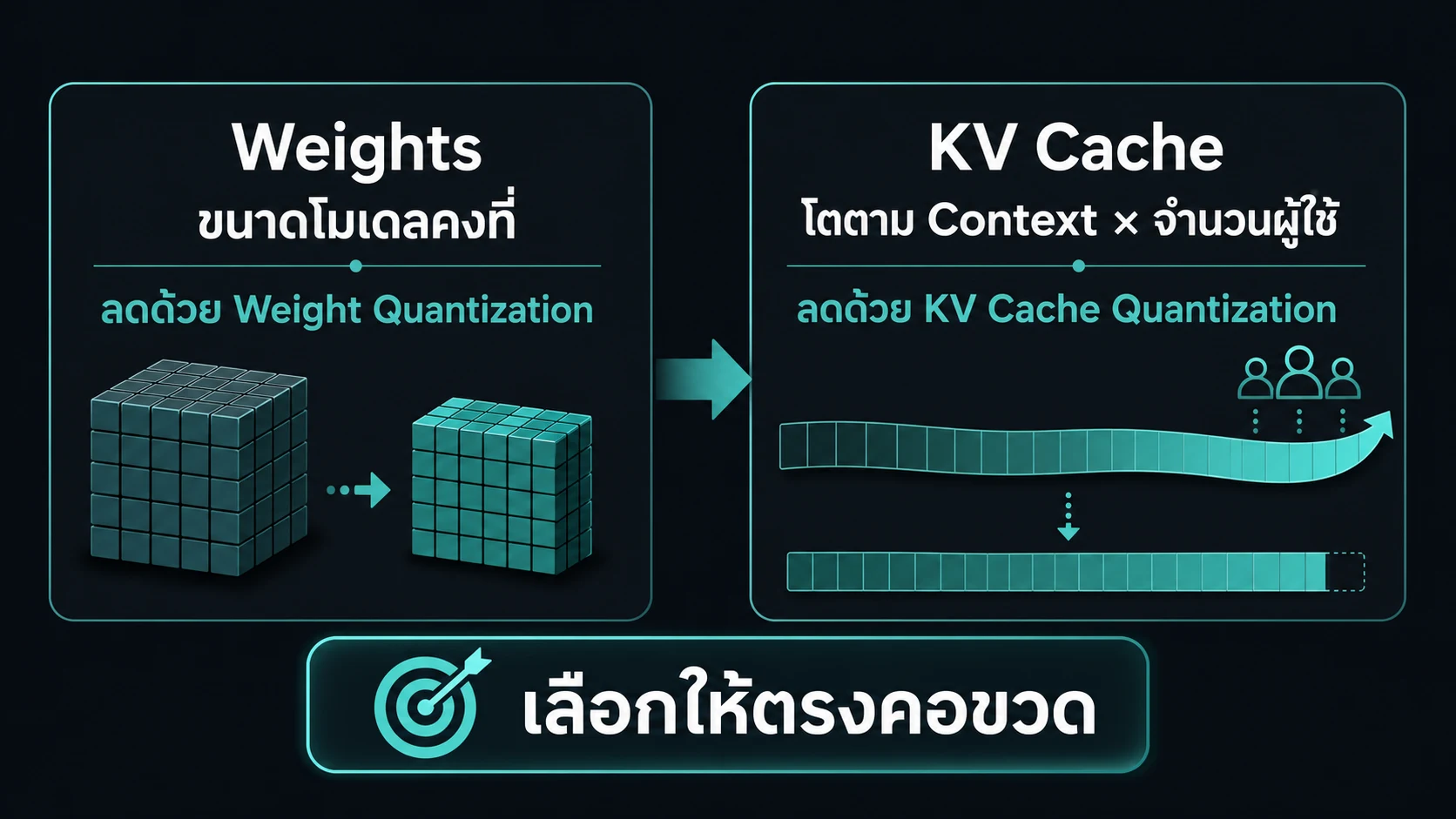
TWO SEPARATE BUDGETS
Weights are fixed KV cache grows with work
- Weights
- Reduce model footprint and bytes read per token
- KV cache
- Reduce memory per context × sequence

USE IT ON REAL WORK
Use quantization on the actual bottleneck
Start with the runtime you will operate, then choose the artifact and bit width. Weight quantization and KV-cache quantization reduce different memory pools, so inspect the breakdown separately.
Four-bit weights reduce the model pool more aggressively. Eight-bit KV is a safer starting point for long context. QAT and MXFP4 need a matching artifact and runtime path.
| Symptom | Adjust | Verify |
|---|---|---|
| Weights do not fit | Move weights from 8-bit to a supported 4-bit format | Checkpoint, kernel, and task evaluation |
| Long context exhausts KV | Start with FP8 or INT8 KV before 4-bit KV | KV per sequence and long-context retrieval |
| Quality-critical workflow | Use QAT 4-bit or 8-bit weights where available | Reasoning, tool calls, JSON, and Thai |
| Need MXFP4 | Use a native MXFP4 checkpoint with supported kernel and hardware | The real load mode, not only a Q4 name |
| Running on a Mac | Use an MLX or GGUF/Metal path | Artifact converted for that runtime |
Before lowering bits
- Record the
runtime, runtime release, and checkpoint - Keep
weight quantseparate fromKV cache dtype - Set
working contextfrom ordinary requests, not the maximum limit - Compare baseline and 4-bit or 8-bit on the same prompt, context, batch, and sampling
- Test grounded answers, tool calls, and structured output before deployment
runtime = vllm
weight_format = QAT_W4A16
kv_cache_dtype = fp8_e4m3
working_context = 32768
compare_to = weight_q8 + kv_bf16
Weights and KV cache are different budgets
When looking at a 70B model, model weights in FP16/BF16 consume nearly 140 GB of VRAM completely out of reach for a 24 GB RTX 3090/4090. But assuming 4-bit quantization reduces total VRAM to 35 GB and finishes the story is a classic cause of production OOM crashes!
Correct engineering memory planning requires splitting VRAM into 4 distinct pools:
- Model Weights (Fixed size): Memory reserved for neural network parameters. This footprint remains constant from server boot. If weights exceed VRAM, server startup fails immediately (Boot Failed).
- KV Cache (Variable size): Temporary memory holding Attention Key-Value states for active tokens. This pool expands dynamically with Context Length and Batch Size (concurrency). Under long context or heavy traffic, KV Cache can consume massive memory.
- Runtime & Activation Overhead (System overhead): Space for CUDA Context, PagedAttention metadata, NCCL buffers, and Tensor Core scratchpads. Frameworks like vLLM or TensorRT-LLM reserve 1.5 - 3.5 GB upfront.
- Draft Model (If using Speculative Decoding): Additional VRAM if running a spec-decode draft model.
Understanding this distinction is critical: Weight quantization solves the first bottleneck (fitting the model onto cards), while KV Cache quantization solves the second bottleneck (handling high concurrency and long documents).
4-bit and 8-bit model weights
Comparing a 32B model like Qwen 3.6: running at 8-bit (INT8 or FP8) requires ~33-35 GB of weight VRAM, needing workstation or enterprise GPUs like RTX 6000 Ada, A100, or H100. Downscaling to 4-bit (INT4 / AWQ / GGUF Q4_K_M) drops weight VRAM to ~18-20 GB, enabling instant deployment on 24 GB consumer GPUs like RTX 3090/4090 or RTX 5090!
However, bit width alone does not tell the full story of performance and accuracy:
- 8-bit (FP8 / INT8): Uses double the weight VRAM of 4-bit, but retains ~99% of original BF16 reasoning, complex coding, and long-doc retrieval accuracy with far superior Outlier Weight Protection.
- 4-bit (INT4 / AWQ / GPTQ): Dramatically cuts memory footprint, allowing cost-conscious users to run 32B-70B models on consumer cards. The trade-off is a slight increase in hallucination risk on edge cases and quality dependence on quantization algorithm, group size (e.g. group-128 vs group-64), and calibration dataset quality.
Four-bit weights have several families
Do not assume all 4-bit files perform identically. Low-bit engineering encompasses fundamentally different compression families and philosophies:
- AWQ (Activation-aware Weight Quantization): AWQ recognizes that not all weights are equally important. By identifying channels with high activations during inference, AWQ protects those critical weights from precision loss. It offers an excellent balance between speed and quality for Post-Training Quantization (PTQ) on vLLM and SGLang.
- GPTQ & AutoRound: GPTQ applies layer-wise Hessian optimization to minimize overall rounding error. AutoRound improves further using Sign-Gradient Descent to optimize rounding across calibration data, significantly reducing 4-bit hallucination rates.
- QAT (Quantization-Aware Training): The holy grail of 4-bit precision. Rather than truncating weights post-training (PTQ), QAT embeds 4-bit rounding simulation directly into training or fine-tuning. The model learns to self-compensate for quantization error, yielding 4-bit quality nearly indistinguishable from FP16! (e.g., Gemma 4 QAT).
- NVFP4 & MXFP4 (Microscaling Formats): Cutting-edge formats from NVIDIA Blackwell and OCP using FP4 E2M1 representation paired with fine-grained block scales (1 scale per 16 or 32 values), delivering hardware-accelerated speeds directly on modern Tensor Cores.
When evaluating 4-bit models, inspect the artifact family and verify whether your runtime engine (vLLM / llama.cpp / MLX) has native accelerated kernels for that format.
GGUF is a llama.cpp container, not one quant
In local LLM serving on Mac/PC, GGUF is the most widely cited format. Remember: GGUF is not a compression algorithm! GGUF is a binary container format created by GGML / llama.cpp that bundles model weights, architecture specs, and tokenizer metadata into a single .gguf file.
Inside a GGUF file, multiple quantization levels are available depending on your VRAM budget:
- Q4_K_M (Medium 4-bit): The balanced starting point for general workloads, applying K-quants to use different bit widths across attention and feed-forward layers for optimal quality-to-size ratio.
- Q5_K_M / Q6_K: Ideal for users with extra VRAM headroom needing higher confidence in Thai language, coding, or complex text analysis, trading 20-30% more VRAM for safety margin.
- Q8_0: Preserves near-FP16 precision, ideal for benchmarking or mission-critical tasks.
Note that effective bits per weight in GGUF files exceed 4.00 bits because scale factors, min-values, and unquantized first/last layers add overhead. Always download GGUF files converted directly from original high-precision BF16/FP16 sources (such as Unsloth) rather than re-quantized low-bit files.
4-bit and 8-bit KV cache
When a server runs smoothly initially but hits 100% VRAM and OOM crashes as context hits 32K or concurrency reaches 10 users, KV Cache memory overload is the culprit!
By default, servers store KV Cache in FP16 or BF16 (2 Bytes per element). Quantizing KV Cache alters this equation:
- FP8 / INT8 KV Cache (~50% memory reduction): Stores Key-Value states at 1 Byte per element, halving KV Cache VRAM footprint immediately with minimal accuracy loss. It is the safety-first option to enable on vLLM, SGLang, or TensorRT-LLM.
- 4-bit / INT4 KV Cache (~70-75% memory reduction): Reduces KV storage to ~0.5 Bytes per element. This enables 128K context windows or dozens of concurrent sequences on a single GPU. However, it carries a risk of attention accuracy degradation over long contexts (Long-context Retrieval Drift) and requires thorough testing with real prompts.
Note: KV cache quantization does NOT reduce model weight file size by a single megabyte, but it acts as a force multiplier for context length and concurrency!
QAT is a checkpoint trained for quantization
Traditionally, obtaining a 4-bit model meant taking a full FP16/BF16 checkpoint and running Post-Training Quantization (PTQ) analogous to sudden surgery on a neural network, inevitably causing loss of reasoning capability.
QAT (Quantization-Aware Training) changes the game. During pre-training or fine-tuning, engineers inject fake 4-bit quantization operators into the training loop. The network adapts its weight distribution to become inherently resilient to 4-bit rounding noise.
QAT checkpoints (such as Google Gemma 4 QAT or DeepSeek QAT releases) achieve near-parity with original BF16 models (98-99% benchmark retention). QAT is not a runtime switch it requires using an officially released QAT checkpoint repository.
QAT W4A16 vs NVFP4: Matching 4-bit Quantization to Hardware and Workloads
When choosing 4-bit quantization paths, distinguish between two separate technical axes:
- QAT (Quantization-Aware Training): A training/fine-tuning process that embeds fake quantization to compensate for rounding noise.
- W4A16 vs W4A4 (Precision Format): W4A16 keeps activations at 16-bit (FP16/BF16) while storing 4-bit weights. W4A4 quantizes both weights and activations to 4-bit.
- NVFP4 (NVIDIA Microscaling FP4): FP4 E2M1 format with FP8 block scales (1 scale per 16 values) tuned for NVIDIA Blackwell and Hopper Tensor Cores.
A single checkpoint can combine QAT + W4A16 + NVFP4 weights simultaneously (such as w4a16_nvfp4 in NVIDIA ModelOpt).
Practical Selection Guide by Hardware Vendor and Workload:
- On NVIDIA GPUs (Blackwell / Ada / Hopper): For official NVIDIA NVFP4 checkpoints (e.g. Gemma 4 26B-A4B nvfp4_experts_only or Qwen 3.6 NVFP4), select NVFP4 as the primary server path. Quantizing expert linear layers while preserving attention/router layers yields high prefill speed and concurrency throughput with minimal quality degradation (-0.1 to -0.6 on MMLU Pro / GPQA).
- Single-user Terminal Coding / Tool-calling JSON: In single-user decode (Batch Size = 1), decode tok/s for W4A16 and W4A4 is similar due to memory bandwidth limits across the bus. QAT W4A16 provides a safer quality margin and prevents activation outlier drift.
- On Non-NVIDIA Accelerators (AMD ROCm, Mac Apple Silicon): Prefer QAT W4A16, AWQ, or GGUF Q4_K_M. Preserving 16-bit activations avoids activation outlier degradation on hardware without native FP4 compute units.
MXFP4 is not generic INT4
Do not confuse legacy scalar INT4 with MXFP4 (Microscaling FP4), the new open industry standard from OCP.
Legacy INT4 stores integer scalar values within a narrow dynamic range. MXFP4 uses floating-point FP4 E2M1 representation (2-bit exponent, 1-bit mantissa) combined with block microscaling, sharing one E8M0 scale factor per 32 values.
Including scale overhead, MXFP4 uses ~4.25 effective bits per weight, offering key benefits:
- Wider Dynamic Range: Preserves high-magnitude outlier activations better than INT4, resulting in higher intelligence scores at identical file size.
- Native Hardware Acceleration: Designed for hardware execution on NVIDIA Blackwell (NVFP4 / modelopt_fp4) and AMD Instinct / RDNA4 GPUs.
Peak speed and accuracy require a native MXFP4 checkpoint, a runtime backend with matching kernels (vLLM / SGLang / MLX), and supported hardware accelerators.
Match the artifact to the runtime
- Mac Apple SiliconUse an MLX-converted model or GGUF through llama.cpp on Metal. Use MXFP4 only when the MLX artifact and selected release support it
- llama.cpp / OllamaChoose GGUF such as Q4_K_M, Q5_K_M, or Q8. It works on CPU, Metal, and GPU backends supported by llama.cpp
- vLLM / SGLangChoose a Hugging Face checkpoint and supported loader such as AWQ, GPTQ, AutoRound, QAT compressed-tensors, or native FP4. Model-calibrated FP8 KV can reduce error
- GGUF on vLLMvLLM can load GGUF in some cases, but its documentation calls the path experimental and under-optimized. Do not use it as the default for feature-complete or performance-sensitive serving
Do not choose from the quant name alone: Q8, QAT, MXFP4, AWQ, GPTQ, and GGUF are different artifact types or formats. Match model, runtime, hardware, and kernel every time.
Quality and hallucinations
A fundamental truth in AI engineering: quantization never makes a model smarter it maintains or degrades quality.
Hallucinations can stem from training data, ambiguous prompts, or high sampling temperature, but 4-bit weight compression introduces Quantization Noise Error that surfaces in specific production ways:
- Structured Output Degradation: Invalid JSON formatting, unclosed brackets, or unexpected schema keys.
- Tool-Calling Failures: Mismatched function parameter names or NULL argument injection.
- Reasoning Drift: Dropped accuracy on complex math, code logic, or syntactically complex non-English prompts.
- Long-Context Retrieval Misses: Reduced accuracy in Needle-in-a-Haystack retrieval when 4-bit KV Cache is combined with 4-bit weights.
Do not rely solely on paper MMLU scores. Always test against your actual workload prompts before deploying to production.
Use the calculator in order
For reliable capacity planning, follow this structured engineering workflow with the LLM VRAM Calculator:
- Lock Hardware & Framework: Select your target GPU/computer and serving runtime first (e.g. RTX 4090 24GB + vLLM).
- Analyze Memory Breakdown: Identify where VRAM saturates:
- If server fails at boot -> Model Weights bottleneck: switch weight quantization from FP16 to 8-bit or 4-bit (AWQ / QAT / GGUF).
- If model loads but OOMs on long prompts or higher concurrency -> KV Cache bottleneck: switch KV Cache quantization to FP8 or INT8.
- Apples-to-Apples Benchmark Validation: After confirming VRAM fit in the calculator, run empirical benchmarks holding prompt, context length, batch size, and sampling parameters constant. Measure Peak VRAM, Speed (TTFT / tok/s), and Accuracy (Groundedness / JSON validity) before production rollout.
Sources
Try your configuration
Put the intended model, quantization, context, framework, and hardware into the calculator, then validate with a production-like benchmark.
Open calculator